
Table of Contents
Let me be straight with you. When I started building my own digital presence,
I wasted weeks chasing expensive tools I couldn’t afford—and honestly didn’t
need yet. The truth? Some of the best decisions I made for my clients came
from tools that cost absolutely nothing.
If you own a small business and you’re trying to show up on Google without
burning through your budget, this is the guide. I wish someone had handed me
two years ago. These are the best free SEO tools for small business owners in
2026—not a paid list, not sponsored, just what actually works.
Quick Reality Check:
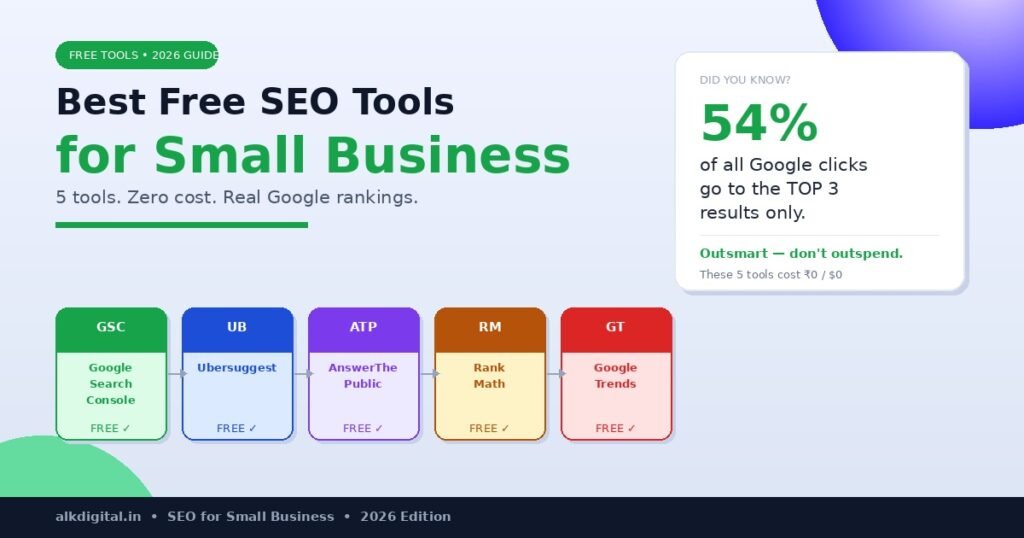
According to Backlinko’s research, over 54% of all Google clicks go to the
first 3 results. You don’t need to outspend competitors—you just need to
outsmart them with the right free SEO tools and a smarter content strategy.
Why Free SEO Tools for Small Business Are Enough to Start
A lot of marketing “gurus” will tell you that you need Ahrefs or SEMrush from day one. But here’s the thing — if your website is under 2 years old and you’re still building authority, paid plans won’t give you dramatically better results than the free SEO tools for small business owners who are just getting started.
What matters more right now is consistency and genuinely understanding your audience. The free SEO tools for small business I’m sharing below will help you find what people are actually searching for, fix technical issues that quietly hurt your rankings, and create content Google wants to show. That’s the full SEO loop — and you can close it without spending a rupee.
1. Google Search Console — Your SEO Command Centre
If you only use one tool from this entire list, make it this one. Google Search Console is the most important free SEO tool for small business owners — full stop. It shows you exactly which search terms bring people to your site, which pages are ranking and at what position, and whether Google can even crawl your pages properly.
Most small business owners set it up once and completely forget about it. That’s a costly mistake. Check it every single week — look for keywords getting impressions but low clicks. Those are your fastest wins: update the title or meta description on that page and watch the clicks climb within weeks.
Best for: Monitoring rankings, fixing indexing issues, uncovering keyword opportunities you didn’t know existed.
Link: https://search.google.com/search-console/about
2. Ubersuggest—Keyword Research Without the Price Tag
When it comes to free SEO tools for small business, Ubersuggest punches well above its weight. The free plan gives you up to 15 keyword ideas per day — more than enough when you’re focused on one topic at a time. Type in your core service (say, “digital marketing for salons”) and it pulls related long-tail phrases with search volumes and difficulty scores right away.
Look for keywords with a difficulty score under 30. Those are the ones a newer website can realistically rank for. Save them in a simple spreadsheet and plan one blog post per keyword. It’s not glamorous, but it genuinely works — and it’s one of the smartest ways to use free SEO tools for small business growth.
Best for: Keyword research, competitor analysis, content planning
Link: https://neilpatel.com/ubersuggest/
Also Read from ALK Digital Marketing:
→ 10 Powerful Technical SEO Secrets That Drive Rankings in 2026
→ How to Rank a New Website on Google in 90 Days: Proven Strategy
→ How to Do an SEO Audit: 7 Brutal Mistakes I Found on a Real Site
→ Best Budget-Friendly Google Ads Strategy for Small Business
3. AnswerThePublic — Find What Your Audience Is Actually Asking
This is one of those free SEO tools for small business owners that people consistently overlook — and they really shouldn’t. AnswerThePublic pulls real questions people are typing into Google and organises them visually by theme. Enter any topic and you’ll see hundreds of “who, what, when, where, why, how” questions your actual audience is searching for right now.
This is gold for blog content. Instead of guessing what to write, you’re directly answering questions your customers already have. Write one solid answer per question and you’ve got a blog post that earns steady traffic for months. Use these questions as H2 and H3 headings — it’s one of the smartest moves you can make with free SEO tools for small business content planning.
Best for: Blog content ideas, FAQ pages, long-tail keyword discovery
Link: https://answerthepublic.com
4. Rank Math—On-Page SEO Made Simple on WordPress
If your site runs on WordPress, Rank Math is non-negotiable. It’s one of the most powerful free SEO tools for small business websites available — and it’s very likely already installed on your site.
Use it to optimise every blog post before you hit publish: set your focus keyword, check your SEO score, write a solid meta description, and confirm your keyword is sitting in the right spots — title, URL, first paragraph, and at least one H2. Rank Math walks you through every step, even if SEO still feels confusing. Think of it as your personal publishing checklist — a must-have among free SEO tools for small business WordPress sites.
Link: https://rankmath.com
5. Google Trends — See What’s Rising Before It Peaks
100% Free | By Google
Here’s a strategy most small businesses completely ignore — and it’s one of the most underrated free SEO tools for small business owners out there. Google Trends shows you how interest in any search term changes over time. When you spot a rising keyword early, you can publish content and build real authority before the competition catches up.
For a digital marketing blog, check trends around topics like “AI in marketing,” “local SEO for service businesses,” or “Instagram ads for small shops.” If the interest graph is pointing upward, that’s your next blog post. Pairing Google Trends with the other free SEO tools for small business on this list gives you a serious advantage at zero cost.
Best for: Spotting rising keywords early, seasonal content planning
Link: https://trends.google.com
Your Simple 3-Step SEO Action Plan
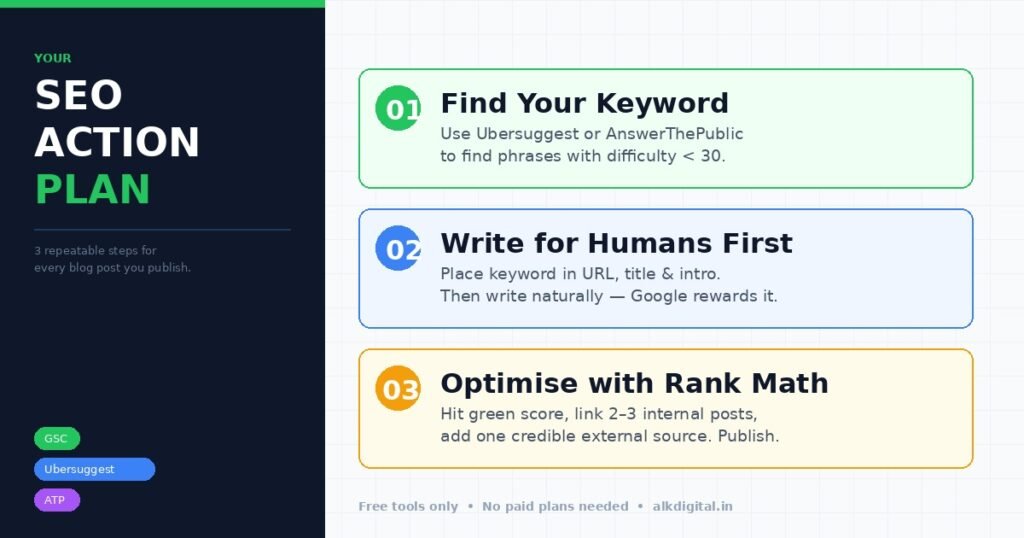
Knowing the best free SEO tools for small business is only half the battle — using them consistently is where real results come from. Here’s a simple system you can repeat for every blog post you publish:
STEP 1 — Find Your Keyword
Use Ubersuggest or AnswerThePublic to find a phrase with solid search volume and a difficulty score under 30. Write it down before you type a single word of content.
STEP 2 — Write for Humans First
Place your keyword in the URL, title, meta description, and opening paragraph — then write naturally. Google has gotten very good at detecting forced stuffing. Write for your reader first, and the keyword will sit naturally.
STEP 3 — Check & Publish with Rank Math
Run your post through Rank Math before publishing. Aim for a green score, link to 2–3 of your existing posts internally, and include one credible external source. Then hit publish.
Helpful External Resources:
- Moz Beginner’s Guide to SEO: https://moz.com/learn/seo
- Backlinko Blog: https://backlinko.com/blog
- Google Search Documentation: https://developers.google.com/search/docs
Final Thought
SEO in 2026 isn’t about spending more — it’s about being more deliberate. The businesses that consistently show up on page one aren’t always the ones with the biggest budgets. They’re the ones who showed up regularly, answered real questions, and trusted the right free SEO tools for small business to do the heavy lifting.
The best free SEO tools for small business owners in 2026 are already available to you right now — Google Search Console, Ubersuggest, AnswerThePublic, Rank Math, and Google Trends. Pick one, build the habit around it, and bring in the others one at a time. Rankings follow consistency — and consistency costs nothing but your time.